How to Make Money on YouTube in 2026: A Practical Guide
Chatple · October 7, 2026
Most advice about making money on YouTube starts and ends with ad revenue. That is a mistake, especially for small channels. Ads are often the slowest and least predictable income a creator has, and plenty of channels with a few thousand subscribers earn more from a single sponsorship or a modest digital product than from a year of AdSense.
This guide walks through every realistic way to earn from a YouTube channel in 2026: the official programs inside YouTube, the income you can build outside it, and a concrete 30-day plan if you are starting small. Where YouTube publishes eligibility requirements, we give the figures commonly cited at the time of writing. These change, so always confirm on YouTube's official Help Center before you plan around a number.
How YouTube income actually works
It helps to think of YouTube money as a ladder rather than a switch.
- Before monetization: you can already earn through sponsors, affiliate links and your own products. YouTube does not need to approve any of these.
- The lower YouTube Partner Program tier: unlocks fan-funding features such as memberships and Super Thanks, plus access to YouTube Shopping in many regions.
- The full YouTube Partner Program tier: adds a share of ad revenue on long-form videos and Shorts.
- Outside the platform: brand deals, products, licensing and communities that do not depend on any single algorithm.
Small creators who wait for step 3 before thinking about money usually leave income on the table for months or years. Start at step 1.
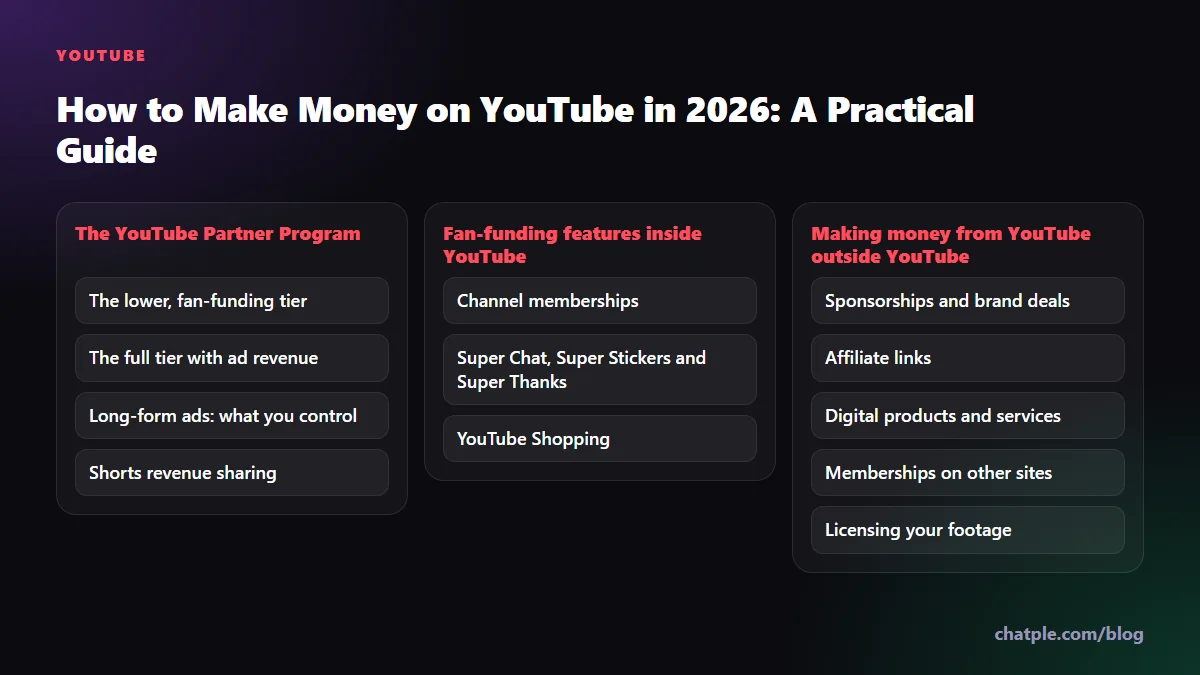
The YouTube Partner Program (YPP)
The YouTube Partner Program is the gateway to on-platform monetization. Everyone applying must follow YouTube's channel monetization policies, live in an eligible country or region, have no active Community Guidelines strikes, use 2-Step Verification on their Google account, and link an AdSense account.
The lower, fan-funding tier
At the time of writing, YouTube commonly lists the following for the expanded, lower-threshold tier in eligible regions:
- 500 subscribers
- 3 public uploads in the last 90 days
- Either 3,000 public watch hours in the last 12 months, or 3 million public Shorts views in the last 90 days
This tier does not include ad revenue, but it opens features where your audience pays you directly: channel memberships, Super Chat, Super Stickers, Super Thanks and, where available, YouTube Shopping. Check the current thresholds and which countries qualify on the YouTube Partner Program overview page, since both have changed several times.
The full tier with ad revenue
The commonly cited requirements for the full tier are:
- 1,000 subscribers
- Either 4,000 public watch hours on long-form videos in the last 12 months, or 10 million public Shorts views in the last 90 days
Once accepted, you earn a share of the revenue from ads shown on your long-form videos and a share of the Shorts Feed ad revenue pool. Your income depends heavily on your audience's location, your niche, the time of year (ad budgets rise toward the end of the year) and how long people watch. A personal finance channel and a gaming clips channel with identical views can earn very different amounts.
Long-form ads: what you control
You cannot set your ad rates, but you can influence them:
- Videos over 8 minutes can carry mid-roll ads. Place them at natural breaks rather than letting YouTube auto-insert them mid-sentence. Viewer drop-off costs you more than one extra ad earns.
- Advertiser-friendly content matters. Heavy profanity in the first seconds, graphic content or controversial topics can lead to limited ads. Read YouTube's advertiser-friendly content guidelines once, properly.
- Searchable topics often attract steadier ad income than trend-driven ones, because evergreen videos keep earning for years.
Shorts revenue sharing
Shorts monetization works differently from long-form. Ad revenue from the Shorts Feed is pooled, a portion is set aside to cover music licensing for Shorts that use it, and the remainder is distributed to creators based on their share of eligible Shorts views. At the time of writing, YouTube states that partners keep 45% of their allocated amount.
In practice, Shorts typically earn far less per view than long-form videos. Their real value for a small channel is discovery: they reach new viewers who may later watch your long-form content, join memberships or buy what you sell. Treat Shorts as a funnel, not your main paycheck.
Fan-funding features inside YouTube
These are the features that the lower tier unlocks, and they are where engaged small channels can outperform much bigger ones.
Channel memberships
Members pay a monthly fee for perks you define: badges, custom emoji, members-only posts, early access, behind-the-scenes videos or members-only live streams. A few tips that make memberships work:
- Offer something recurring, not a one-time bonus. "A monthly members-only Q&A" keeps people subscribed. "A thank-you shout-out" does not.
- Start with one or two tiers. Too many options confuse people.
- Mention memberships at moments of high goodwill, for example after you have just solved a viewer's problem on screen.
Super Chat, Super Stickers and Super Thanks
Super Chat and Super Stickers let viewers pay to highlight a message during live streams and Premieres. Super Thanks lets them tip on regular uploads and Shorts, with a highlighted comment attached. Two habits raise this income noticeably: reading and thanking Super Chats out loud during streams, and replying to every Super Thanks comment. People tip when they feel seen.
YouTube Shopping
YouTube Shopping lets eligible creators tag products in videos, Shorts and live streams, either from their own store or, through the YouTube Shopping affiliate program in supported countries, from other brands' catalogs for a commission. Eligibility and supported regions differ, so check the current requirements in YouTube Studio under the Earn section. If you already review products, this is one of the easiest additions to your income.
Making money from YouTube outside YouTube
Even after you join YPP, off-platform income often ends up larger. It is also more stable, because no algorithm change can switch it off overnight.
Sponsorships and brand deals
Brands do not only want huge channels. Many prefer small, focused channels because their audiences trust them and their rates are reasonable.
How to price a sponsorship. A simple method is to price per thousand expected views:
- Take your median views per video over the last 10 uploads, measured about 30 days after publishing. Use the median, not your best hit.
- Choose a rate per thousand views that reflects your niche. Technical, finance and B2B niches can usually charge more than broad entertainment.
- Multiply, then adjust for extras: a dedicated video costs more than a 60-second integration, and usage rights (the brand reusing your clip in its own ads) should be priced separately.
For example, if your median is 6,000 views and you settle on $20 per thousand views, a 60-second integration would come to about $120 before extras. The rate itself is your call. Test it, and raise it when brands accept without negotiating.
How to pitch. Keep the email short:
- One line on who you are and what your channel is about
- Two or three numbers: median views, audience top countries, age range
- Why this specific brand fits your audience, with one example video
- A clear offer, such as "a 60-second integration in a video publishing next month"
Attach or link a one-page media kit with your channel stats, audience demographics from YouTube Analytics, two or three past results, and your rates or "rates on request". Always disclose paid promotions using the paid promotion setting in YouTube Studio and say so in the video, as required by YouTube's policies and advertising rules in most countries.
Affiliate links
Affiliate links work best on YouTube because videos are searchable and keep getting views for years. A "best budget microphone for beginners" video can earn commissions long after you post it. Put links near the top of the description, explain in the video why you recommend each item, and only promote things you would genuinely use. Disclose affiliate relationships clearly.
Digital products and services
If viewers regularly ask you the same question, you probably have a product. Common examples:
- Presets, templates, spreadsheets or code snippets
- Short courses or workshops
- One-to-one consulting, coaching or reviews
- Ebooks or guides that go deeper than a free video can
A product priced at $20 sold to 50 people earns $1,000, which can take a small channel a very long time to reach with ads.
Memberships on other sites
Patreon, Ko-fi, Buy Me a Coffee and similar platforms let you run memberships outside YouTube. They usually take a smaller cut than in-app purchases on mobile and give you a direct relationship (often including email addresses) with your supporters. Many creators run both: YouTube memberships for convenience, an external page for deeper tiers.
Licensing your footage
If you film something unusual or newsworthy, media companies and licensing agencies may pay to use the clip. Keep your original files and never sign away full rights without understanding what you are giving up.
A newer option: fan-made creator coins
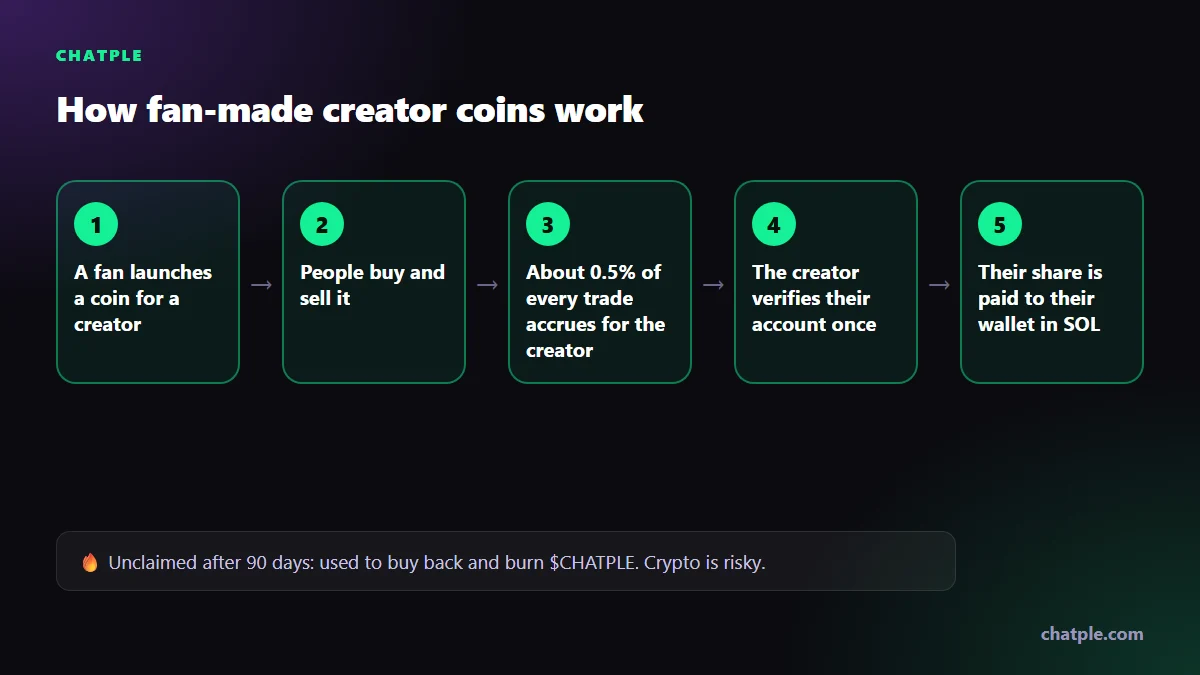
One newer way creators are being supported is through fan-made creator coins. Chatple is a Solana launchpad where a fan can make a coin for a creator in about a minute. Every time someone buys or sells that coin, a small share of the trading fee goes to the creator. Creators earn about 0.5% of each trade, and that share starts accruing even before the creator has heard the coin exists.
To collect it, a creator verifies their account once. For YouTube, that means pasting a one-time code into your channel description. After that, your share is paid automatically in SOL to your own wallet. Verification also works for Twitch, Kick and X. If a creator never claims within 90 days, their unclaimed share is not kept by Chatple. It is used to buy back and burn the platform token, $CHATPLE.
A few details are relevant to YouTubers who stream:
- New coins carry an anti-sniper fee that starts near 50% and drops to 1% within two minutes, so bots that buy in the first seconds pay heavily.
- Streamers get a free OBS overlay that shows the coin's live price, buy alerts and a scan-to-buy QR code.
- Fans can sign in with X, and a wallet is created for them automatically.
Be clear-eyed about the risks. Crypto is volatile and a coin's price can fall to zero. Trading volume, and therefore fee income, can stop at any time, so treat this as an occasional bonus, never as income you rely on. Nothing here is financial advice. Before you promote any coin, check your local tax and financial rules and YouTube's policies on promoting cryptocurrency and paid promotions, and think about whether it suits your audience. You can find out more at chatple.com.
Your first 30 days: a plan for a small channel
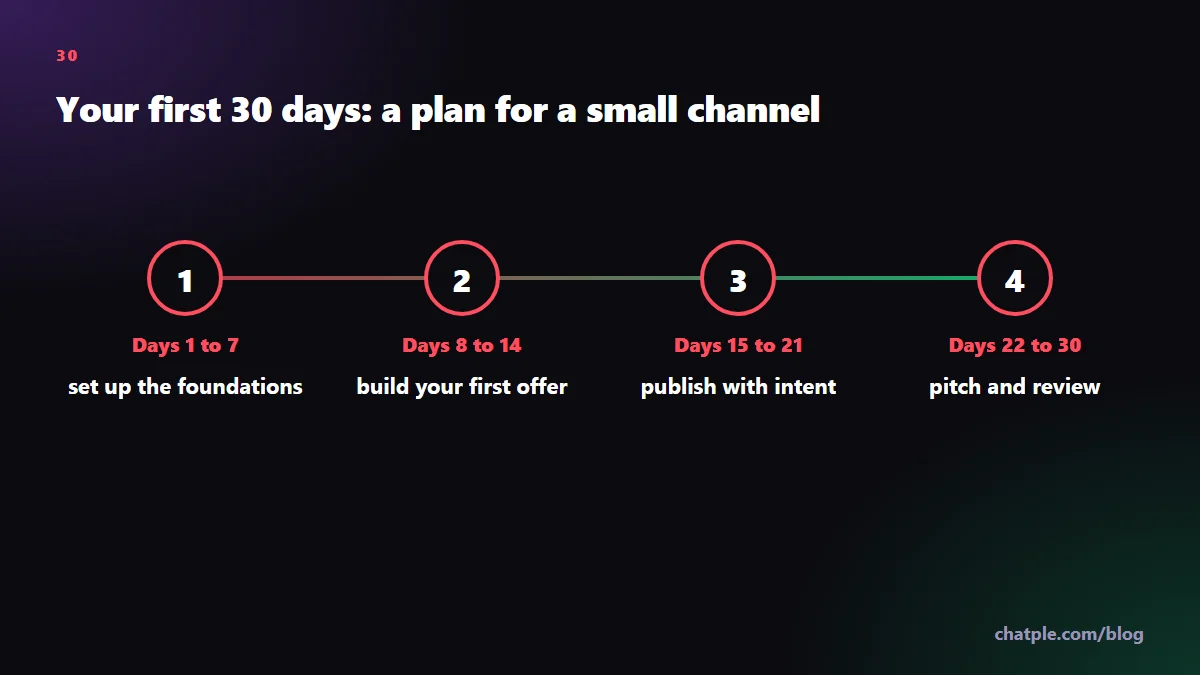
This plan assumes you have a channel with a modest audience, perhaps a few hundred subscribers, and a few hours a week.
Days 1 to 7: set up the foundations
- Turn on 2-Step Verification and check that your country is eligible for YPP.
- Open YouTube Analytics and write down your median views, average view duration and top traffic sources. This is your baseline and the core of your media kit.
- Sign up for one or two affiliate programs that match what you already talk about, and add links to your five most-viewed videos.
- Write a one-paragraph channel description that says clearly who the channel is for.
Days 8 to 14: build your first offer
- List the three questions viewers ask most often in comments.
- Turn one answer into a simple paid or free resource: a checklist, template or short guide. A free resource that collects email addresses is a valid start.
- Create a one-page media kit.
Days 15 to 21: publish with intent
- Publish one searchable long-form video aimed at a specific question in your niche, with a relevant affiliate link or your resource in the description.
- Publish three Shorts that each point to that long-form video.
- Reply to every comment in the first 48 hours.
Days 22 to 30: pitch and review
- Make a list of 15 brands whose products already appear in your videos or your viewers' comments.
- Send five short, personalized pitches per week.
- Review your Analytics: which video brought subscribers, which link got clicks, which Shorts led to long-form views. Do more of what worked next month.
Repeat this cycle each month. The channels that earn well on YouTube are rarely the ones that found a trick. They are the ones that kept a steady schedule and added one income stream at a time.
FAQ
How many subscribers do you need to make money on YouTube?
None, for sponsorships, affiliate links and your own products. For YouTube's own features, the lower Partner Program tier is commonly cited at 500 subscribers and the ad revenue tier at 1,000, along with watch-hour or Shorts-view requirements. Check YouTube's Help Center for current thresholds in your country.
How much does YouTube pay per 1,000 views?
There is no fixed rate. Earnings depend on niche, audience location, video length, season and how many viewers see ads. Long-form videos usually earn much more per view than Shorts. Look at your own RPM in YouTube Analytics once you are monetized rather than relying on averages from other channels.
Can you make money from YouTube Shorts?
Yes. Partners earn from Shorts Feed ad revenue sharing, and Shorts views can count toward Partner Program eligibility. Per-view income from Shorts is generally low, so most creators use Shorts to grow and to send viewers to long-form videos, memberships or products.
Do I need to disclose sponsored content on YouTube?
Yes. Use the paid promotion setting in YouTube Studio and mention the sponsorship clearly in the video. Advertising rules in many countries also require affiliate links to be disclosed.
Is there a way to earn from fans before I am monetized?
Yes. Sponsorships, affiliate links, external membership platforms and digital products all work before you join the Partner Program. Fan-made creator coins are another newer option, but they carry crypto price risk and should be treated as a bonus rather than dependable income.